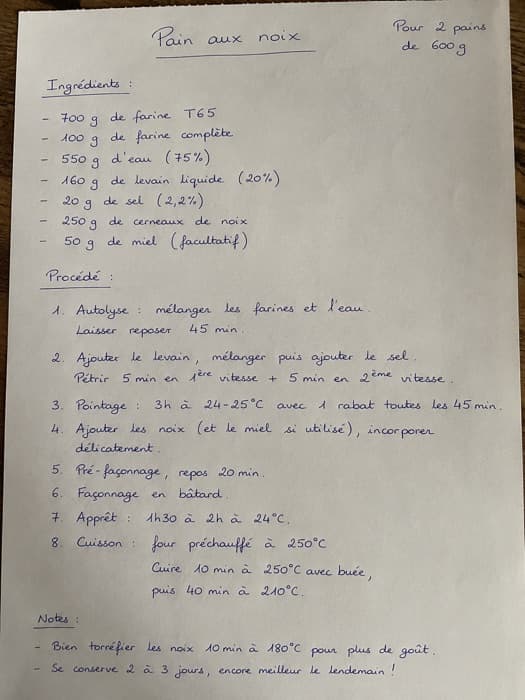
A photo is enough
Take a photo of a handwritten recipe or describe it: BreadUp prepares the recipe, and you check it before saving.
AI assistant
BreadUp uses AI to save you the typing: a recipe created from a photo, a text or your voice, a supplier catalogue read from a PDF, nutritional values estimated when they are missing. Nothing is saved without your confirmation. You can also connect your own assistant, such as Claude or ChatGPT, to look at your data, read only.
From €29/month excl. VAT · Onboarding session included
BreadUp · read only
Your assistant
Tomorrow, three recipes are planned:
74.98 kg of dough in total, losses included.
Before
With BreadUp
Take a photo of a handwritten recipe or describe it: BreadUp prepares the recipe, and you check it before saving.
Speak, and BreadUp transcribes and fills in the recipe. Handy when your hands are in the flour.
Query your recipes, productions and orders from Claude or ChatGPT, without being able to change anything.
A photo, a text, your voice or a PDF catalogue.
The ingredients, quantities and steps are recognised and linked to your ingredients.
You correct if needed, then save. Nothing is saved without you.
Answers to the questions bakers ask us most often.
Another question? Write to usIn a new recipe, add a photo, describe the recipe or dictate it, then start the generation. BreadUp fills in the form and you check it before saving.
Yes. In the settings, under Integrations, copy the MCP connection address and add it to your assistant. You then authorise access on a BreadUp screen.
Look at it: search for a recipe, list your productions, your starters or your orders, print a recipe as a PDF, summarise your activity. Access is read only.
They are estimates, flagged as such. Check them against the product's technical data sheet before using them on a label.
Yes. AI recipe creation, catalogue import and connecting your assistant are included in the paid plans.